Video Description
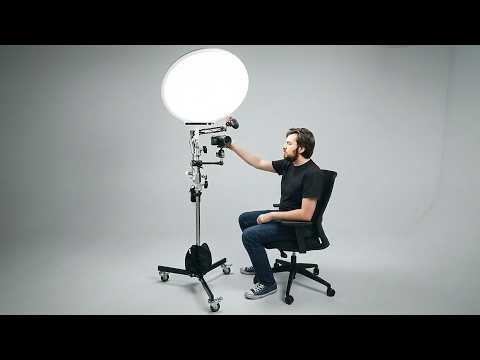
If you want to film videos faster and more consistently, this rolling studio setup is the ultimate hack!
? Check this entire setup here (Amazon Link) ➡️ https://geni.us/cP7QYcb
? Ready to record? Use code THINKMEDIA to get your first month of Riverside Pro free ➡️ https://creators.riverside.com/ThinkMedia21
? Take the Free YouTube Growth Assessment here ? https://mycreatorquiz.com/
This video is sponsored by @Riversidefm. Some product links are affiliate links which means if you buy something we'll receive a small commission.
=============================
All Products and Gear Mentioned in this video
=============================
? Ready to record? Use code THINKMEDIA to get your first month of Riverside Pro free ➡️ https://creators.riverside.com/ThinkMedia21
? Check this entire setup here (Amazon Link) ➡️ https://geni.us/cP7QYcb
Impact Folding Wheel Base ➡️ https://geni.us/iDBOk
Neewer Heavy Duty Light Stand ➡️ https://geni.us/JHSAT
Sandbags ➡️ https://geni.us/I30un
RODE VideoMic Go II ➡️ https://geni.us/mFYO7y
Neewer 6" End Jaw Grip ➡️ https://geni.us/iW8iP
SmallRig V Mount Battery ➡️ https://geni.us/DlK9jA
3.5 Auxiliary Cable ➡️ https://geni.us/AP6X
amaran Verge Stand Adapter ➡️ https://geni.us/vHBzCL
amaran Verge Max LED ➡️ https://geni.us/7YaH
Pergear TH3 Pro DSLR Camera Tripod ➡️ https://geni.us/DBpNC7S
NEEWER Super Clamp with 5/8" Stud ➡️ https://geni.us/imAzRA
NEEWER 6.3 cm Multi Function High Load Swivel Ball Head ➡️ https://geni.us/qXMKw
Impact 6" Extension Arm with Spigot ➡️ https://geni.us/i43MMv
V-Mount Battery Adapter with Clamp ➡️ https://geni.us/xtUP
InnoGear Boom Arm Microphone Mic S ➡️ https://geni.us/eUBSd3
===========================
Connect with us!
=============================
Tik Tok: ➡︎ https://www.tiktok.com/@thinkmediaofficial/
IG: ➡︎ https://www.instagram.com/officialthinkmedia/
===========================
Subscribe and Listen to the Think Media Podcast HERE:?
===========================
➡︎YT: @ThinkMediaPodcast
➡︎Apple: https://apple.co/2F3tmIS
➡︎Spotify: https://spoti.fi/36qevE8
⏰ Timecodes ⏰
0:00 I Built My Entire YouTube Studio… on ONE Stand!
0:51 Rolling Stand
1:42 Lighting
3:28 Camera Mount
4:29 How to Record Remote Interviews
5:45 Microphone Setup
7:55 Camera & Lens
8:48 Final Result
===========================
Here are the ways to work with us here at Think Media:
===========================
⚡️FREE CLASS: Watch our FREE YouTube class here: ➡︎ http://ThinkMasterclass.com
⚡️BOOK: Check out the #1 best-selling book YouTube Secrets here: ➡︎ https://ytsecrets.com/
⚡️For Support inquires, or Business inquiries, please go to ➡︎ http://ThinkMediaSupport.com
⚡️Join our YouTube Course & Community TODAY with this special limited-time bundle at: http://joinvra.com
===========================
Connect with Sean Cannell on Social Media:
===========================
➡︎https://www.linkedin.com/in/seancannell/
➡︎https://twitter.com/seancannell
➡︎https://instagram.com/seancannell
===========================
What We Use For Music:
===========================
? Get a 7-day free trial for new personal and commercial plan here! ➡️ http://thinkmediasounds.com
===========================
In-Depth Channel Analytics and Ideas
===========================
Get a 30-Day trial of vidIQ's Boost plan for just $1 here: ? http://vidiq.com/think
===========================
#thinkmedia #seancannell #youtubetips
If you want to film videos faster and more consistently, this rolling studio setup is the ultimate hack. We start with a heavy-duty rolling stand and attach a slim LED soft light, a professional shotgun microphone on a boom arm, and a mirrorless camera—all powered without a single wall outlet! I break down every clamp, arm, and mount you need to replicate this exact $800 setup, plus how to quickly convert it for vertical filming. Whether you shoot with a smartphone or a mirrorless camera, this all-in-one rig will make recording YouTube videos, remote interviews, and podcasts easier than ever.
Our mission here at Think Media is to help purpose-driven entrepreneurs go full-time doing what they love and making an impact through the power of video.
Disclaimer: Please see the link for our disclaimer policy for all of our videos on the Think Media and Think Media Podcast YouTube channels. https://go.thinkmedia.com/youtube-disclaimer